
SnapView Features
The core tools for fast Mac photo review, folder-first browsing, and lightweight culling before editing.
Key Features
- Per-photo editing with Light, Color, Tone Curve, Film, Crop and geometry, and Watermark & Frame NEW 3.0
- AI-powered first-pass culling that suggests Pick and Reject candidates while leaving the final choice to you NEW 3.0
- Auto Enhance informed by scene brightness and color intent while avoiding overly aggressive changes NEW 3.0
- Recipe Timeline with meaningful edit steps and named A/B snapshots NEW 3.0
- Scene Sync for copying Light, Color, Tone Curve, and Film drafts across matching photos NEW 3.0
- Film and Frame audition with temporary previews or one-step undoable apply NEW 3.0
- Focus Lens for checking the current edit at 100% or 200% NEW 3.0
- Face Lock Compare for aligning a selected face across two to four photos when confidence is sufficient NEW 3.0
- QuickSRNet Large x2 AI enlargement for new Apple silicon settings, with included viewer previews and Supporter AI-copy saving NEW 3.0
- Settings backups and version comparisons, selective restore with Supporter Pass, and included restore undo NEW 3.0
- Clearer navigation and controls: continuous arrow-key browsing, resizable Navigator sources, 14-language settings search, and Light/Dark readability
- No import process or heavy catalog generation
- Ultra-fast directory browsing and keyboard preview navigation
- Browse ZIP archives in real time without extracting
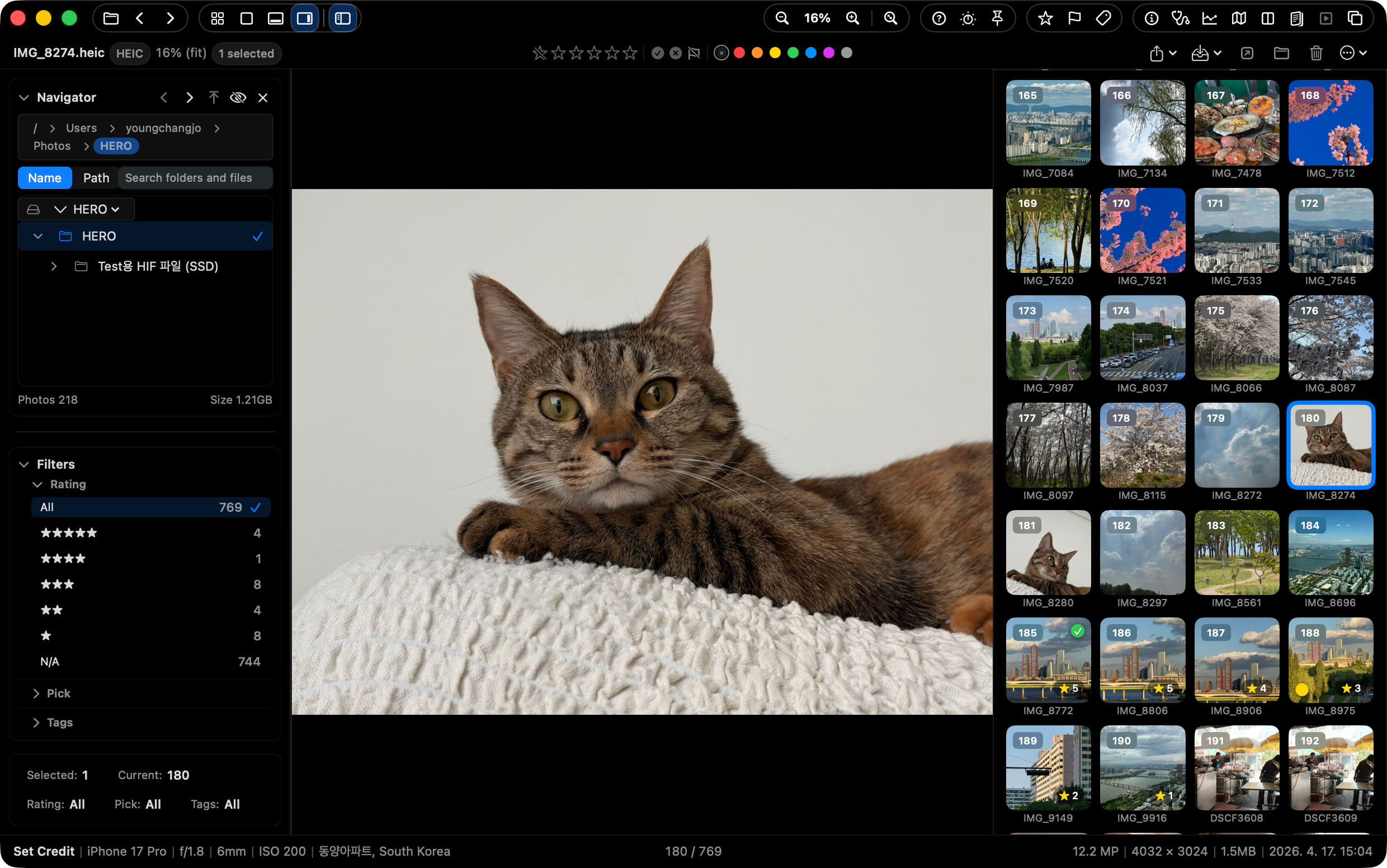
- 4 versatile view modes (Main / Grid / Filmstrip / Pro Layout)
- Pro Layout View with Action Strip, Info Strip, and thumbnail context
- Quick Organize with 3 visible presets, GPS map review, and 3 previewed batch recipes
- Apple Photos browsing, Photos-style Favorite heart, and Photos ↔ disk copy workflows
- HDR photo viewing, quick HDR/SDR switching, and non-AI upscaling
- Consistent sorting across Main, Grid, and Filmstrip with counter/context-menu controls
- Select Tray candidate/final/excluded sets and selected-original handoff
- Drag handoff from Main, Grid, and Filmstrip to Finder, Desktop, editing apps, and Photos
- Command-P print/PDF save for images, selections, folders, ZIP, Photos, and contact sheets
- Multi Monitor Workspace for Navigator, Quick Check, Histogram, Map, Filmstrip, and Select Tray panels
- Persistent thumbnail disk cache for repeat Grid, Filmstrip, and Navigator browsing
- Optional Supporter Pass for continued development, with Mac App Store purchase restore
- Real-time playback/view of RAW, HEIC, and animated formats
- Adjustable Smart Decoding Modes (Speed vs Quality priority)
- Intuitive Fullscreen Slideshow review with transition effects
- Real-time culling sync with Lightroom (XMP Rating, Pick/Reject)
- Seamless integration with macOS Finder color tags
- Visual Duplicate checking and batch cleaner
- Side-by-side multiple image Compare Mode (up to 4 images)
- AI-assisted Quick Check for blink, focus, and exposure signals
- Image Export for smaller sharing copies (JPEG/PNG, social presets)
- On-device OCR to recognize and copy text from photos
- Capture date/GPS edits for supported photos
- Intuitive Histogram, detailed EXIF info, and GPS Map panels
- Seamless keyboard-centric File Management (Select/Copy/Paste/Delete)
- Convenient Always On Top mode for multi-tasking
Preview edits and culling suggestions in Creative Suite. Saving edited copies or recipes and applying culling decisions require Supporter Pass. Viewer AI previews and settings-file backups are included with Basic. Version 3.0 is available on the Mac App Store.
Supported Formats
ARW, CR2, CR3, NEF, NRW, DNG, RAF, ORF, RW2, PEF, SRW, 3FR, FFF, CRW, RWL, SR2, IIQ
JPG, PNG, GIF, BMP, WEBP, HEIC, HEIF, TIFF, PSD, JPEG 2000, DICOM, EXR/HDR, TGA, ICNS
MP4, MOV, M4V
Direct ZIP archive browsing, XMP sidecar writing for ratings and flags
Fast Review Workspace
- RAW and image browsing: open RAW, JPG, PNG, HEIC, TIFF, and supported video files directly from folders.
- Direct ZIP browsing: inspect archived albums without extracting them first.
- Keyboard-first views: switch with
Q,W,E,R,T, andTab.
Pro Layout View
Press Tab to bring folder navigation, filmstrip context, action controls, photo information, ratings, and color labels into one review surface.
Culling And Organization
- Quick Organize: run up to three visible copy or move presets for repeated sorting.
- Batch Actions: preview up to three export, copy, or move recipes before applying them.
- Finder and Lightroom handoff: keep Finder tags and XMP-backed ratings available outside SnapView.
Inspection Tools
- Quick Check: review focus, exposure, and closed-eye signals without handing decisions to automation.
- Map Overlay: see GPS-backed location context beside the photo when location data exists.
- Compare and Duplicate: inspect similar shots side by side and clean exact duplicate files.
SnapView 기능
가벼운 사진 확인, 폴더 중심 탐색, 편집 전 빠른 선별에 필요한 Mac용 핵심 도구입니다.
빠른 뷰어 핵심 기능
- 사진별 편집으로 Light, Color, Tone Curve, Film, 자르기·기하 보정, Watermark & Frame 조절 NEW 3.0
- 최종 선택은 사용자가 결정하는 AI 자동 1차 선별과 Pick·Reject 후보 제안 NEW 3.0
- 장면의 밝기와 색상 의도를 고려하고 과도한 변화를 피하는 자동 보정 NEW 3.0
- 의미 있는 편집 단계와 이름 있는 A/B 스냅샷을 보관하는 Recipe Timeline NEW 3.0
- 같은 장면의 사진에 Light, Color, Tone Curve, Film 초안을 복사하는 Scene Sync NEW 3.0
- 후보를 잠시 보거나 한 번의 실행 취소 단위로 적용하는 Film·Frame 미리보기 NEW 3.0
- 현재 편집 결과를 100% 또는 200%로 확인하는 Focus Lens NEW 3.0
- 판단 신뢰도가 충분할 때 2–4장의 선택한 얼굴 위치를 맞추는 Face Lock Compare NEW 3.0
- QuickSRNet Large x2 AI 확대: Apple Silicon 새 설정의 기본 모델, 기본 뷰어 미리보기와 Supporter AI 사본 저장 NEW 3.0
- 설정 백업과 버전 비교, Supporter Pass 선택 복원과 기본으로 제공하는 되돌리기 NEW 3.0
- 탐색과 조작 개선: 방향키 연속 탐색, 높이를 조절하는 네비게이터, 14개 언어의 설정 검색과 라이트·다크 가독성
- 가져오기(Import) 및 무거운 카탈로그 파일 생성 없음
- 초고속 디렉토리 기반 탐색 및 키보드 프리뷰 이동
- 압축 해제 없이 ZIP 파일 실시간 탐색
- 목적에 맞게 전환하는 4가지 뷰 모드 (Main / Grid / Filmstrip / Pro Layout)
- 액션 스트립, 정보 스트립, 썸네일 맥락을 포함한 프로 레이아웃 뷰
- 빠른 정리 3개 프리셋, GPS 지도 리뷰, 미리보기 가능한 배치 레시피 3개
- Apple Photos 탐색, Photos Favorite 하트, Photos ↔ 디스크 복사 흐름
- 메인 뷰어의 HDR 사진 보기, 빠른 HDR/SDR 전환, non-AI 업스케일링
- Main, Grid, Filmstrip에 걸친 일관된 정렬과 이미지 카운터/우클릭 정렬 진입
- Select Tray 후보/최종/제외 묶음과 선별 원본 복사 핸드오프
- Main, Grid, Filmstrip에서 Finder, 데스크탑, 편집 앱, Photos로 이어지는 드래그 전달
- Command-P 인쇄/PDF 저장으로 이미지, 선택 항목, 폴더, ZIP, Photos, 콘택트 시트 출력
- Multi Monitor Workspace로 Navigator, Quick Check, Histogram, Map, Filmstrip, Select Tray를 보조 디스플레이에 배치
- 지속 썸네일 디스크 캐시로 Grid, Filmstrip, Navigator 재방문 흐름 보조
- 기본 보기 흐름은 유지하면서 지속 개발을 돕는 선택형 Supporter Pass와 Mac App Store 구매 복원
- RAW, HEIC 및 움직이는 이미지(GIF, WebP) 실시간 뷰 지원
- 상황에 맞춰 조율하는 스마트 디코딩 모드 (속도/보통/화질 최우선)
- 직관적인 화면 전환 슬라이드쇼 리뷰
- Lightroom과 실시간 선별/분류 동기화 (XMP Sidecar 별점, Pick/Reject)
- macOS Finder 컬러 태그 완벽 연동
- 중복 사진 시각적 파악 및 일괄 정리 모드
- 다중 사진 나란히 보기 비교 모드
- 눈감음, 노출, 초점 등을 AI로 확인하는 보조 도구 (Quick Check)
- 공유용 작은 복사본을 만드는 이미지 내보내기 (JPEG/PNG, 소셜 프리셋)
- 사진 속 문자를 인식하고 복사하는 온디바이스 OCR
- 지원되는 사진의 촬영 시각/GPS 보정
- 직관적인 히스토그램, 카메라 EXIF 분석 및 GPS 위치 맵 제공
- 키보드 중심의 끊김 없는 파일 관리 (선택/복사/붙여넣기/삭제)
- 다른 작업과 함께 보기 편리한 화면 맨위 고정 지원
Creative Suite Preview에서 편집과 선별 제안을 미리 확인할 수 있습니다. 편집 사본·레시피 저장과 선별 결정 적용에는 Supporter Pass가 필요합니다. 뷰어 AI 미리보기와 설정 파일 백업은 기본으로 제공합니다. 3.0은 Mac App Store에서 사용할 수 있습니다.
지원 포맷
ARW, CR2, CR3, NEF, NRW, DNG, RAF, ORF, RW2, PEF, SRW, 3FR, FFF, CRW, RWL, SR2, IIQ
JPG, PNG, GIF, BMP, WEBP, HEIC, HEIF, TIFF, PSD, JPEG 2000, DICOM, EXR/HDR, TGA, ICNS
MP4, MOV, M4V
압축 해제 없는 ZIP 바로 탐색, 별점과 플래그용 XMP Sidecar 쓰기
빠른 리뷰 작업 공간
- RAW와 이미지 탐색: RAW, JPG, PNG, HEIC, TIFF, 지원되는 동영상을 폴더에서 바로 엽니다.
- ZIP 바로 탐색: 압축을 먼저 풀지 않고 보관된 앨범을 확인합니다.
- 키보드 중심 보기:
Q,W,E,R,T,Tab으로 흐름을 유지합니다.
프로 레이아웃 보기
Tab을 누르면 폴더 탐색, 필름스트립, 작업 버튼, 사진 정보, 별점, 색상 라벨을 한 화면에서 함께 볼 수 있습니다.
선별과 정리
- 빠른 정리: 자주 쓰는 복사 또는 이동 프리셋을 최대 3개까지 보이게 두고 반복 작업을 빠르게 처리합니다.
- 일괄 작업: 내보내기, 복사, 이동 레시피를 최대 3개까지 미리 확인한 뒤 적용합니다.
- Finder와 Lightroom 연동: Finder 태그와 XMP 기반 별점을 SnapView 밖에서도 이어서 사용합니다.
검토 도구
- 빠른 체크: 초점, 노출, 눈 감음 신호를 확인하되 최종 판단은 사용자가 유지합니다.
- 지도 오버레이: GPS 정보가 있는 사진은 촬영 위치 맥락을 함께 봅니다.
- 비교와 중복 정리: 비슷한 사진을 나란히 보고 완전 중복 파일을 정리합니다.