SnapView icon SnapView
SnapView 3.0 app icon

SNAPVIEW 3.0 · NOW AVAILABLE

드디어, SnapView에서
사진 편집이 가능합니다.

Photo editing is finally here in SnapView.

The photo editing and AI-powered first-pass culling you asked for.
Find your candidates in the fast viewer, then continue in Creative Suite Preview.

AI-Powered First-Pass Culling · Photo Editing
Creative Suite Preview

Preview edits, culling suggestions, and AI enlargement with Basic.
Save edited copies, recipes, and AI results or apply culling decisions with Supporter Pass.

NEW IN SNAPVIEW 3.0

From first pass to final edit, in one flow.

SnapView 3.0 introduces Creative Suite Preview for the first time, connecting AI-powered first-pass culling and photo editing without leaving the fast viewer flow.

01

Photo editing, now in SnapView

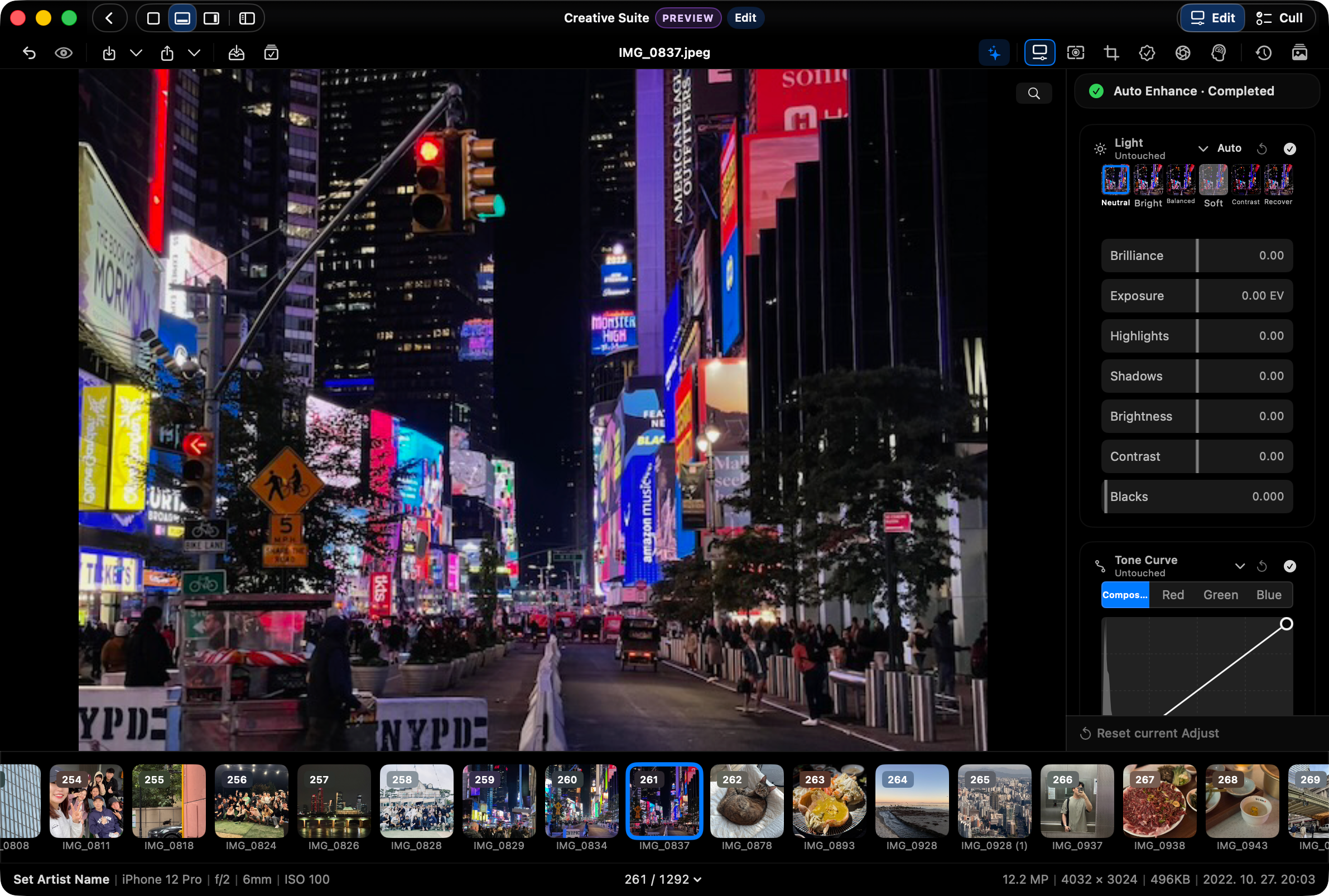
Keep a draft for each photo as you move through a shoot, with Light, Color, Tone Curve, Film, Crop and geometry, and Watermark & Frame tools ready in the same workflow.

SnapView Creative Suite editing a night city photo
Real editing workspace with light, color, and tone curve controls
02

AI-powered first-pass culling

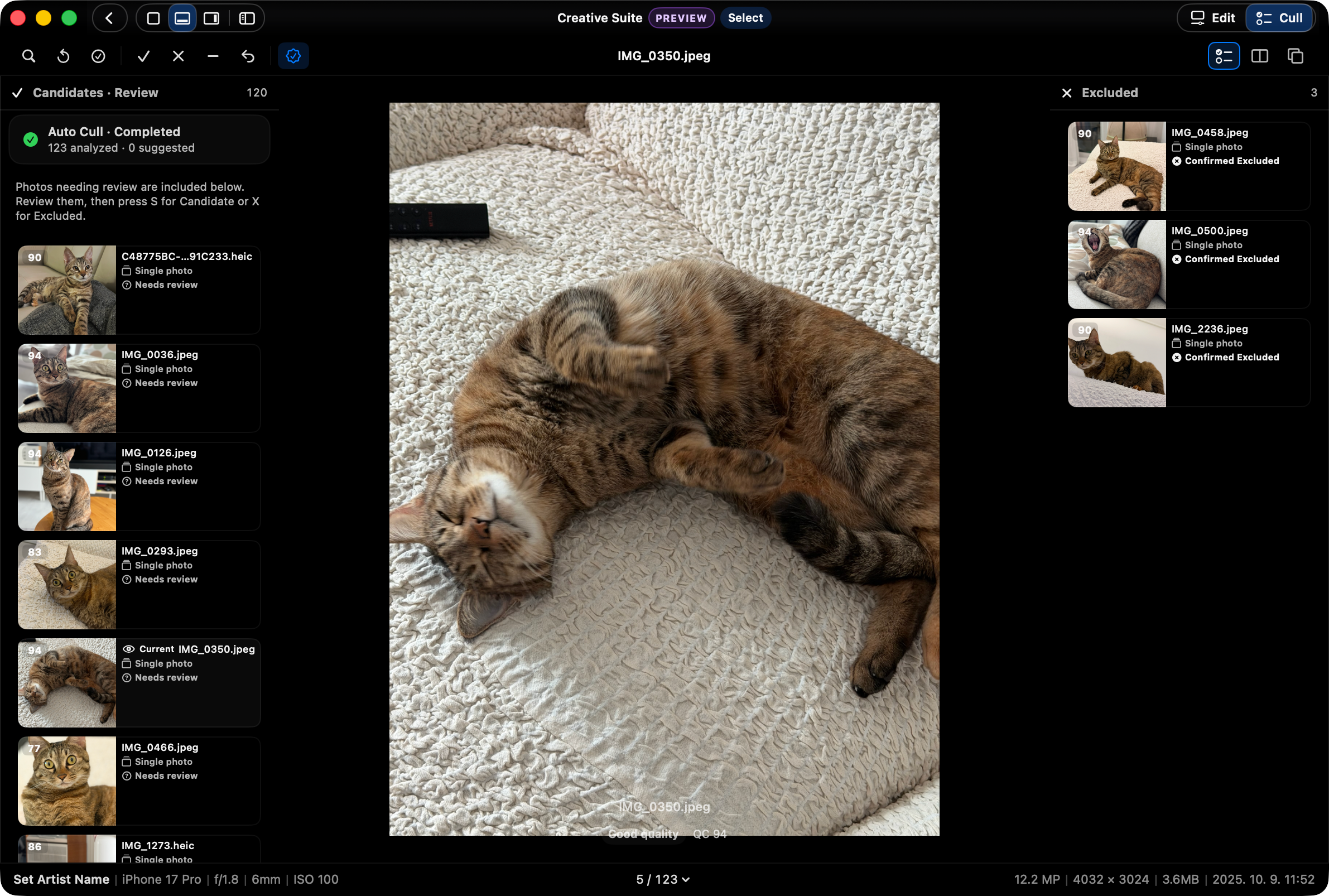
Cull suggests Pick and Reject candidates in one analysis pass. It never changes source files automatically, and you stay in control of the final choice and result.

SnapView Cull with review candidates and three confirmed excluded photos
Review candidates alongside photos you have excluded
03

Bigger, clearer results with AI upscaling

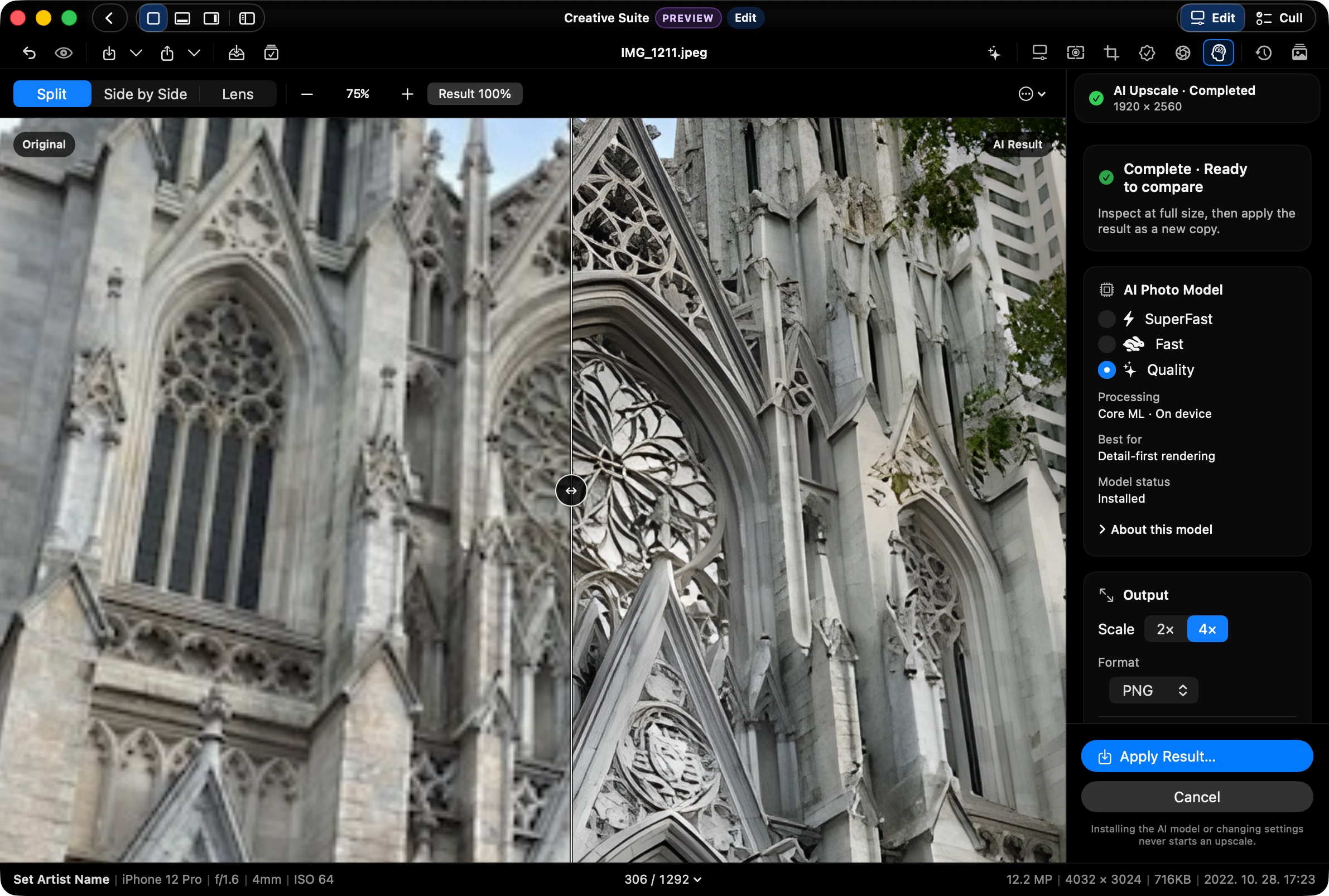
Upscale smaller photos 2x or 4x with an on-device AI model, then inspect the result in split, side-by-side, or lens views. The source stays untouched; saving the result requires Supporter Pass.

SnapView AI Upscaling comparing the original and a 4x result on device
On-device 4x AI enlargement · original and result in split view
04

Culling and editing, connected

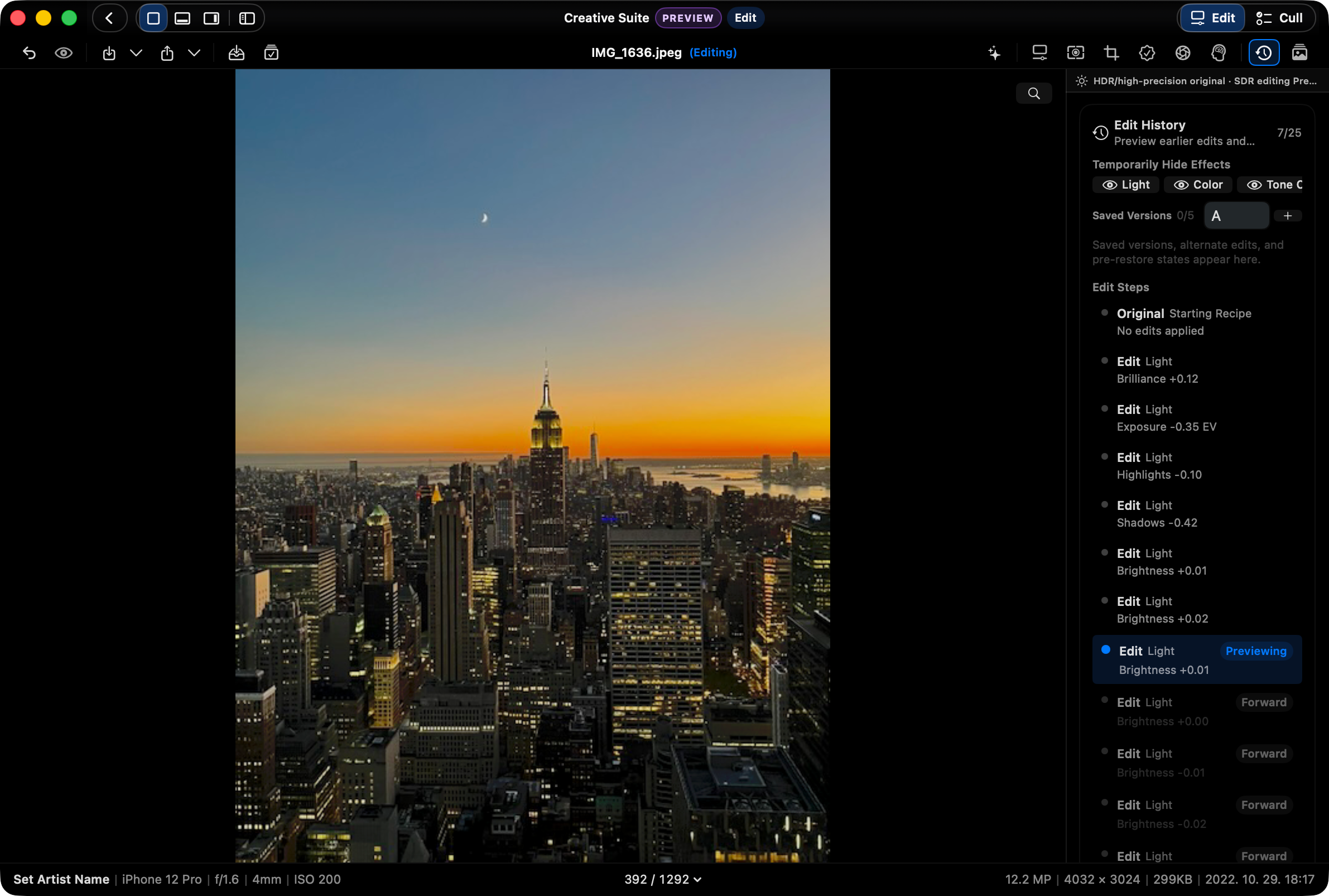
Move between Edit, Film, and Cull, then keep editing steps in Recipe Timeline with named A/B snapshots—without adding a heavy catalog.

SnapView Edit History previewing an earlier photo edit
Select an earlier edit to preview it

MORE IN SNAPVIEW 3.0

Better at every step
of your photo review.

Alongside the new editing tools, browsing, saving, and settings are better. These changes are included in 3.0.

01

Stay with the next photo

Less repeated work while navigating with arrow keys. Preview-to-original changes keep your zoom and position without a full-view fade.

02

AI enlargement, included

QuickSRNet Large x2 is the default for new Apple silicon settings. Toggle the preview in the viewer and save PNG copies with Supporter Pass. Existing choices are preserved.

03

Keep your settings in a file

Create settings backups and compare saved versions. Selectively restore with Supporter Pass; undoing a restore is included.

04

14 languages, clearer controls

Expanded translations for Creative Suite, Photos categories, settings search, and status messages, with clearer long labels and Light/Dark editing controls.

05

Move between Photos and folders

Improved Photos preview/original transitions and returning to your folder. Resize Navigator sources and hide or restore the Select Tray.

06

More reliable restore and save

Keep existing viewing preferences during setup and preserve undo history when canceling a restore. AI copies save correctly to newly selected locations.

SUPPORTER PASS

Keep the results.
Continue your workflow.

Core viewing, manual culling, AI enlargement previews, and settings backups are included. Supporter Pass adds edited and AI copies, culling apply, more reusable workflows, and selective settings restore.

Founding 33% off · through October 1 (Korea time) $9.99 Regular $14.99
Core stays open

Fast viewing and manual culling stay open.

Main, Grid, Filmstrip, Pro Layout View, RAW/ZIP browsing, ratings, and Pick/Reject remain part of SnapView's core value.

Save & apply

Save the results you reviewed.

Save Creative Suite edits, recipes, and AI enlargements, then apply the culling decisions you reviewed. Restore just the settings you need from a backup.

Lifetime pass

Keep your familiar workflow.

Keep up to 10 organization presets and batch recipes, with persistent disk cache and an auxiliary monitor workspace. Existing Founding owners keep their benefits and badge.

Built for people who:

  • Shoot travel, daily life, or family photos
  • Use RAW but don’t want heavy software
  • Just want to view fast and keep the best
  • Prefer simple folder-based workflows

SnapView is built for people who want simple viewing first, and light organization only when needed.

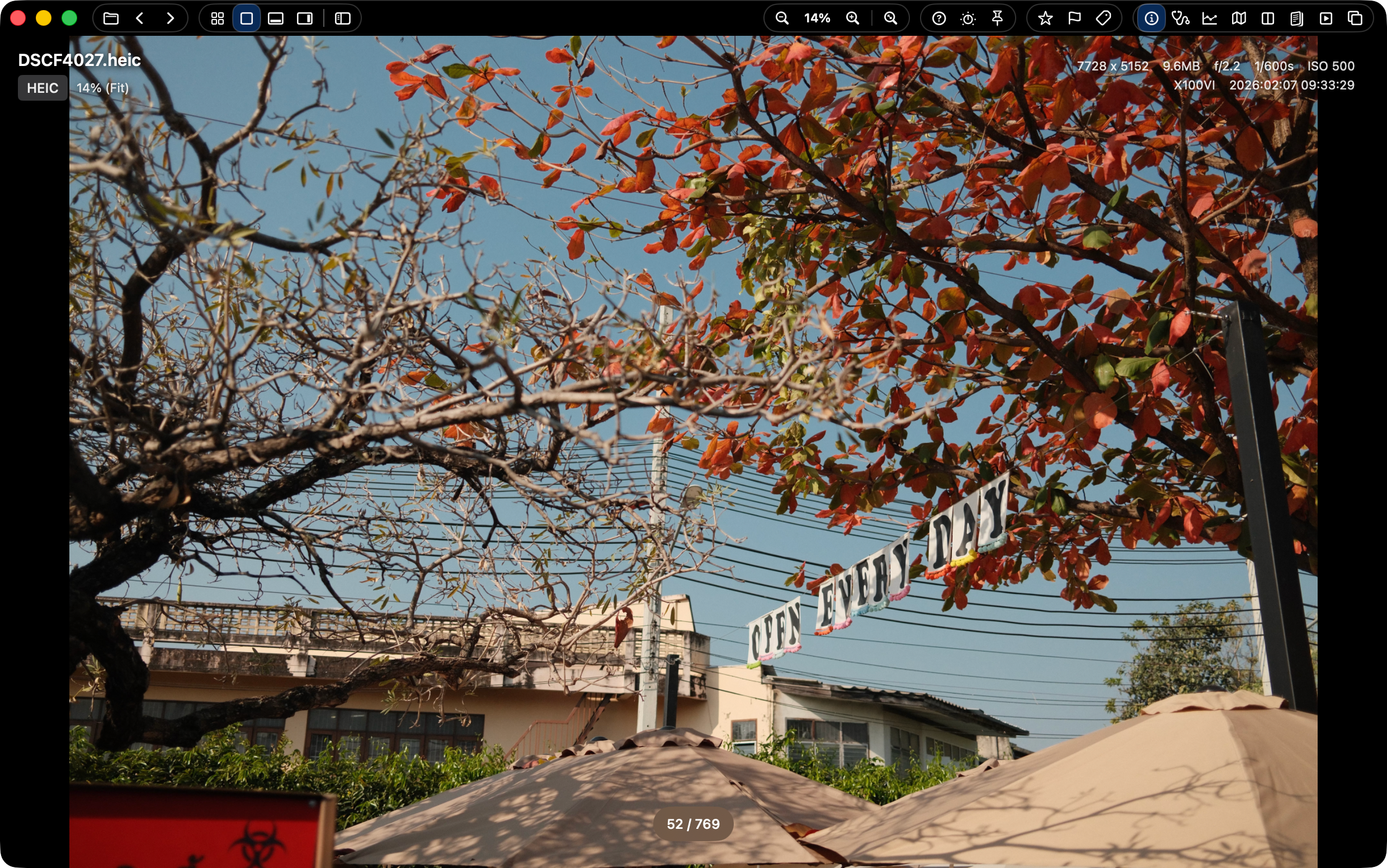
1. A fast, minimal photo viewer

Open instantly with no setup, and see only what matters. SnapView keeps viewing smooth and enjoyable, not heavy or distracting. (W, 0/9)

SnapView Intro/Main view

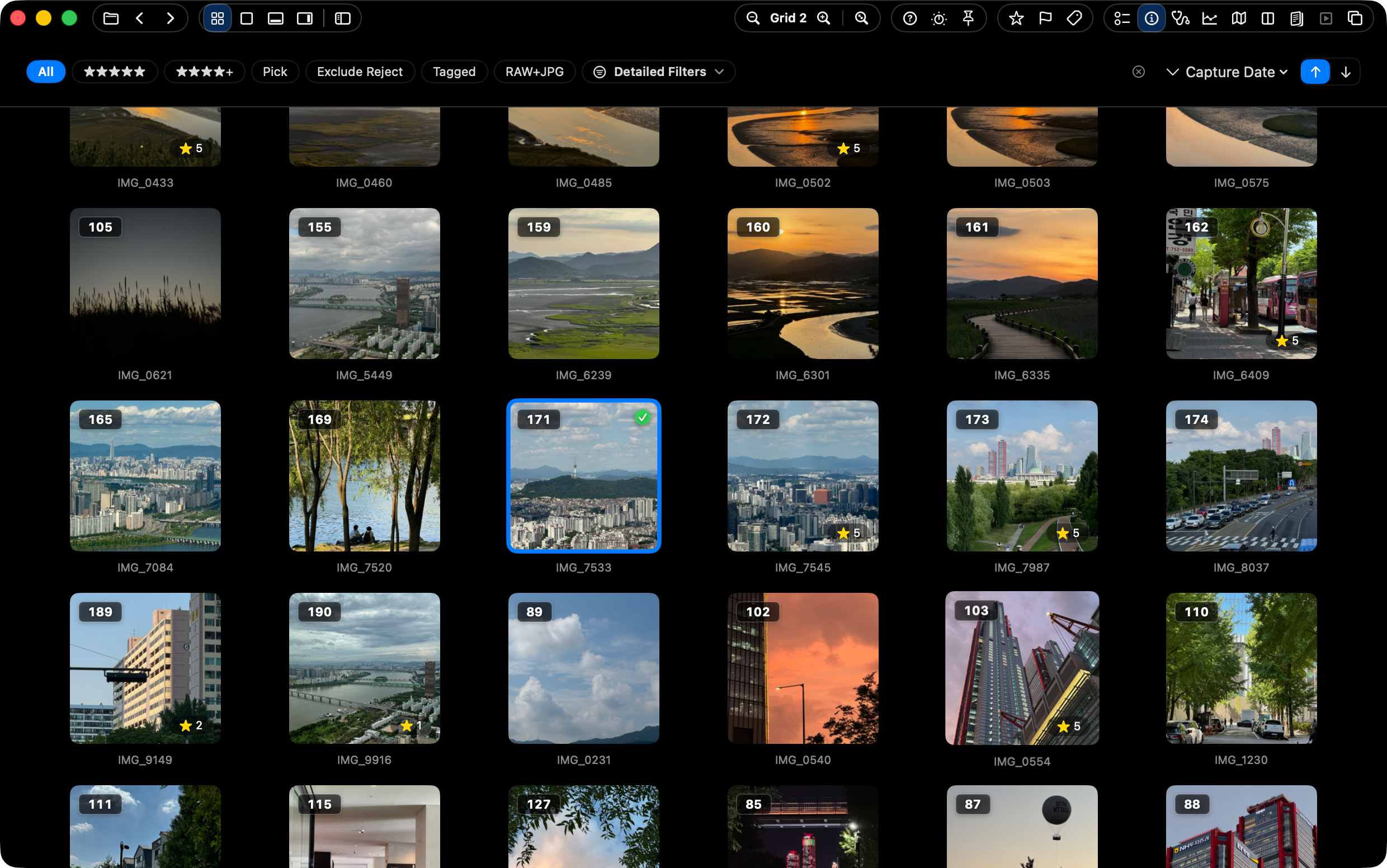
2. Scan hundreds at a glance with Grid

Even after a big shooting day, Grid stays easy to scan. See everything at once and jump to the shot you want without breaking flow. (Q, =/-)

SnapView grid view

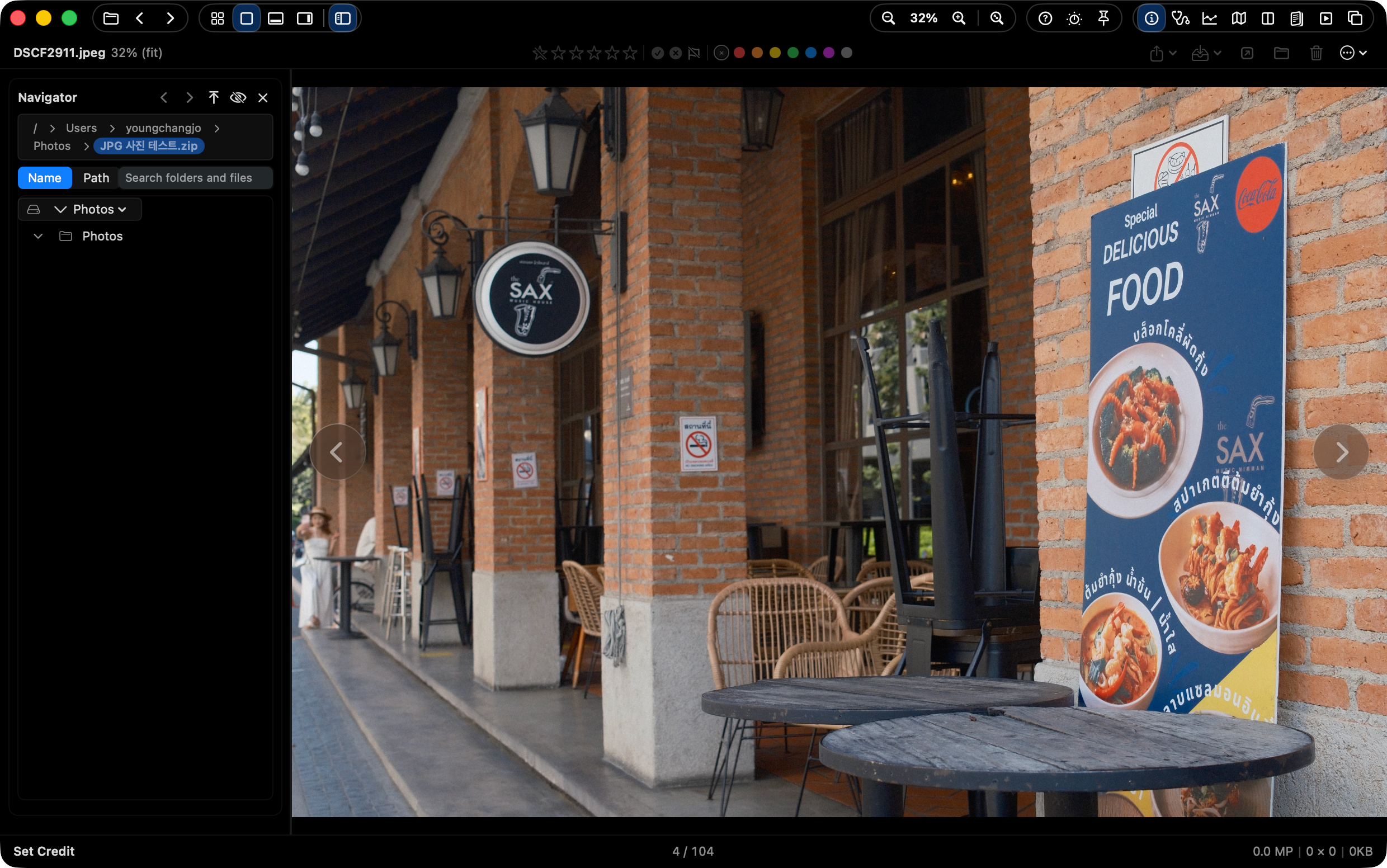
3. Open ZIP albums without extracting

Open ZIP archives directly and review the images inside like a normal folder. It keeps archived albums useful without a separate extraction step.

SnapView ZIP archive browsing

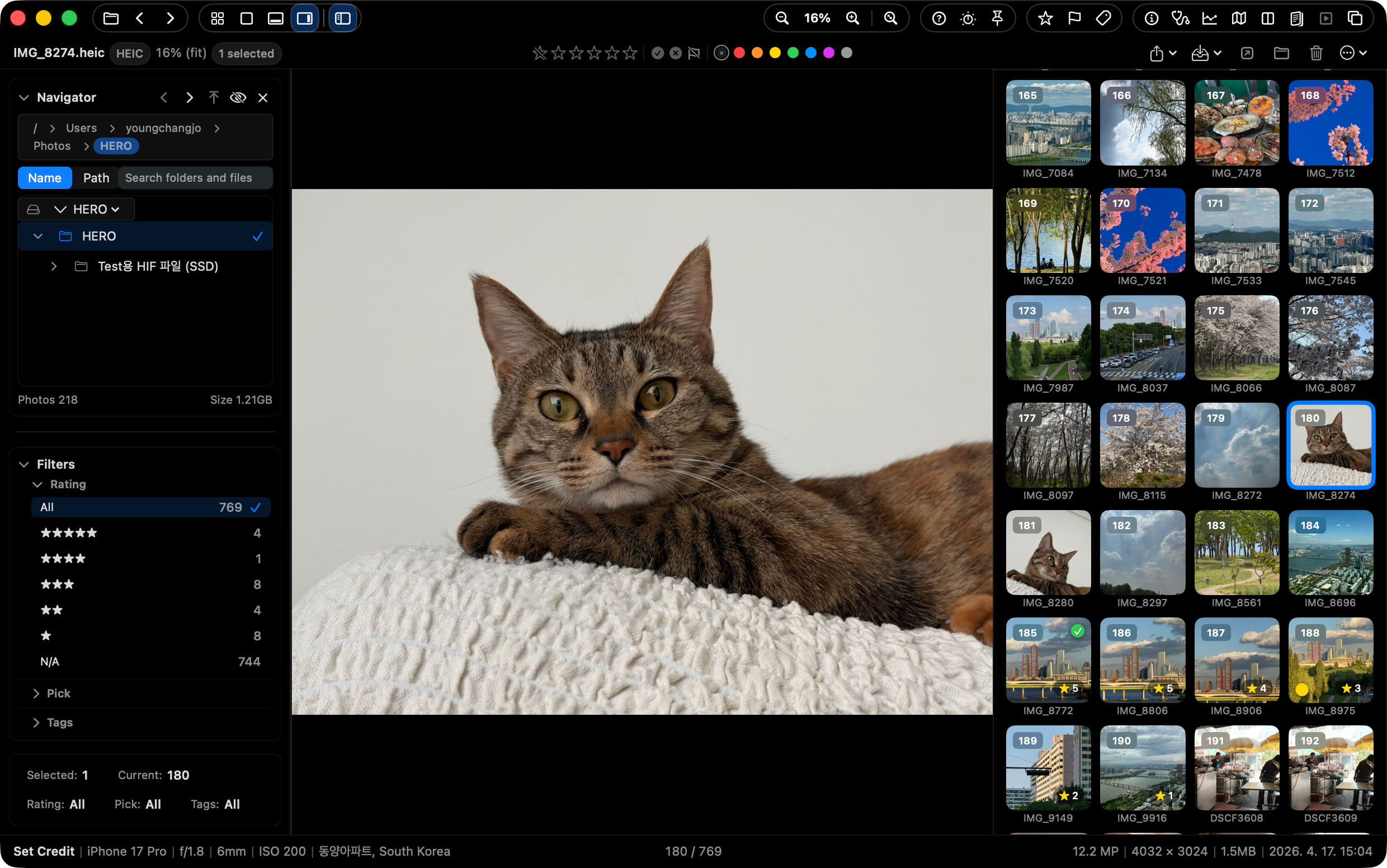
4. Switch into Pro Layout View when the review gets serious

Press Tab for a denser review layout with action and info strips. Ratings, flags, labels, map, histogram, and batch actions stay available without leaving the viewer.

SnapView Pro Layout View

5. Smart Tools to Assist Your Judgment

Pick the best shot instantly and strip away exact duplicates. AI analysis (K), multi-compare (C), and duplicate cleanup tools (Cmd+Shift+D) make your choices fast and precise.

SnapView smart assist tools

Why does it feel so light?

SnapView keeps photo viewing enjoyable, not a project.

Instant folder open pictogram

No import wait

Open a folder and start reviewing. There is no import step.

No catalog database pictogram

No catalog building

No catalog file means launch and navigation stay light.

Mac-native speed pictogram

Mac-native performance

Keyboard input and view changes stay tuned for Mac-native flow.

Focused essentials pictogram

Only what you need

Viewing, picking, and organizing tools stay close without clutter.

APP STORE

App Store ratings and reviews

Korean Mac App Store

See the latest ratings and user reviews on the Korean Mac App Store.

Read ratings and reviews ↗

AI doesn’t replace your eye

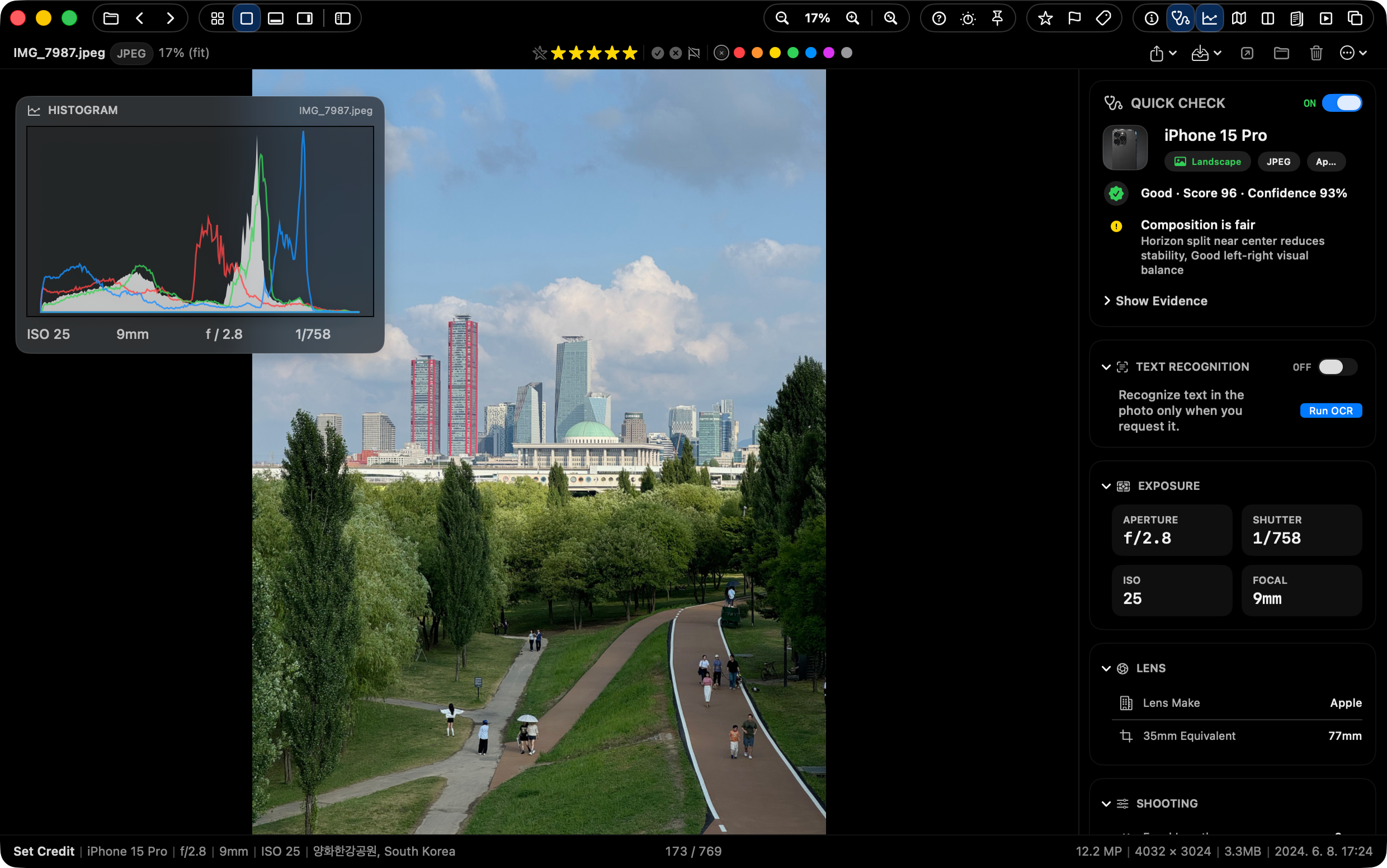
Quick Check highlights useful signals like closed eyes, focus, and exposure. It supports your judgment without forcing decisions.

  • See closed-eye, focus, and exposure signals
  • Reason-based hints for faster picks
  • You stay in control
SnapView quick check panel

Seamless Integration with Lightroom & Finder

Your blazing-fast first culling pass in SnapView instantly syncs with your work tools, without heavy catalog imports.

Lightroom handoff pictogram

Lightroom handoff

Move first-pass selections straight into the editing workflow.

XMP sidecar sync pictogram

XMP sidecar sync

Carry ratings, Pick, and Reject through XMP sidecars.

Finder color tags pictogram

Finder color tags

Color labels stay aligned with native Finder tags.

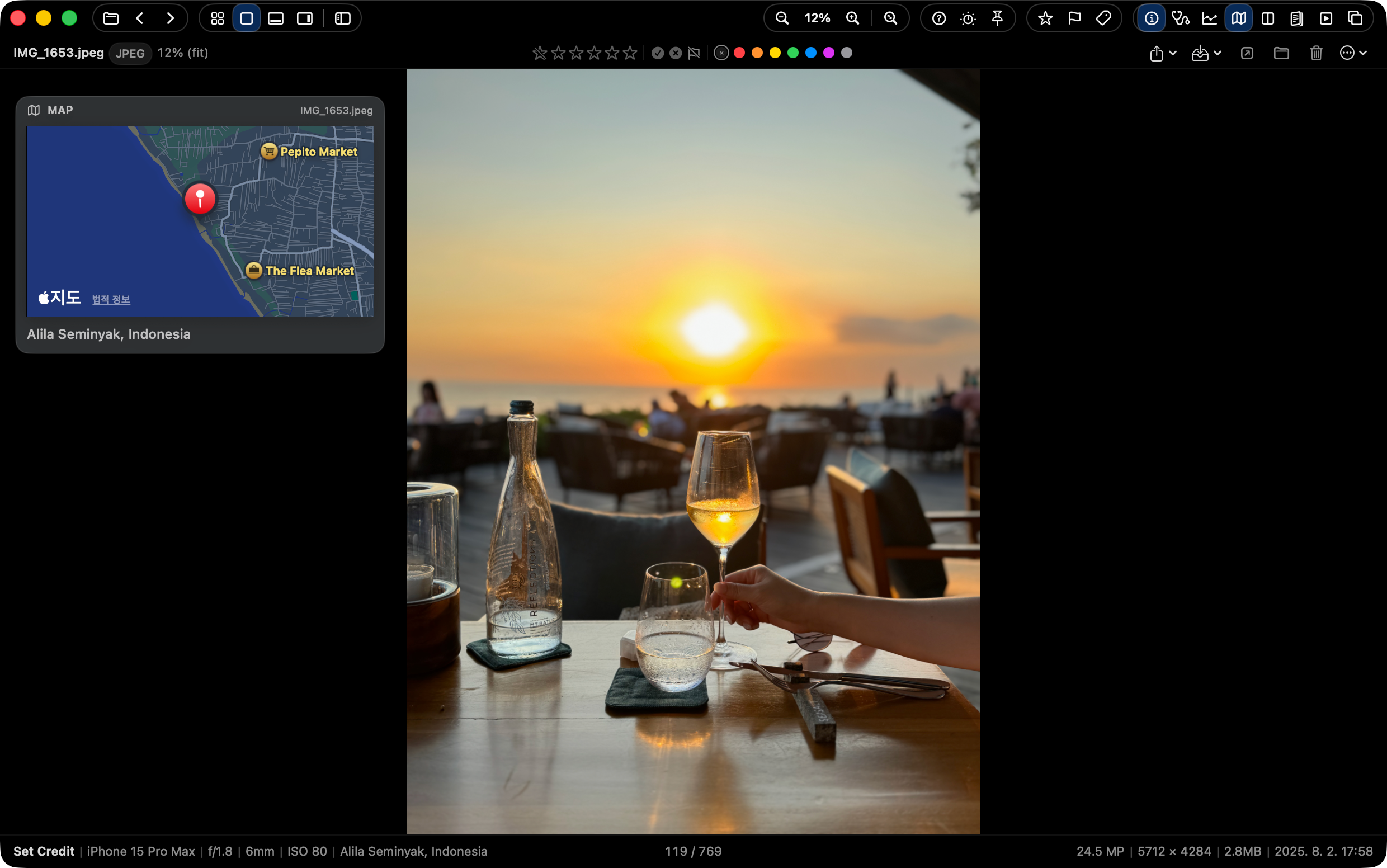
See where the shot happened

When GPS data exists, SnapView keeps location context close to the review surface. Check the place, camera data, and image context without leaving the flow.

  • Map location context
  • Camera and EXIF details
  • Review without opening another app
SnapView GPS map context

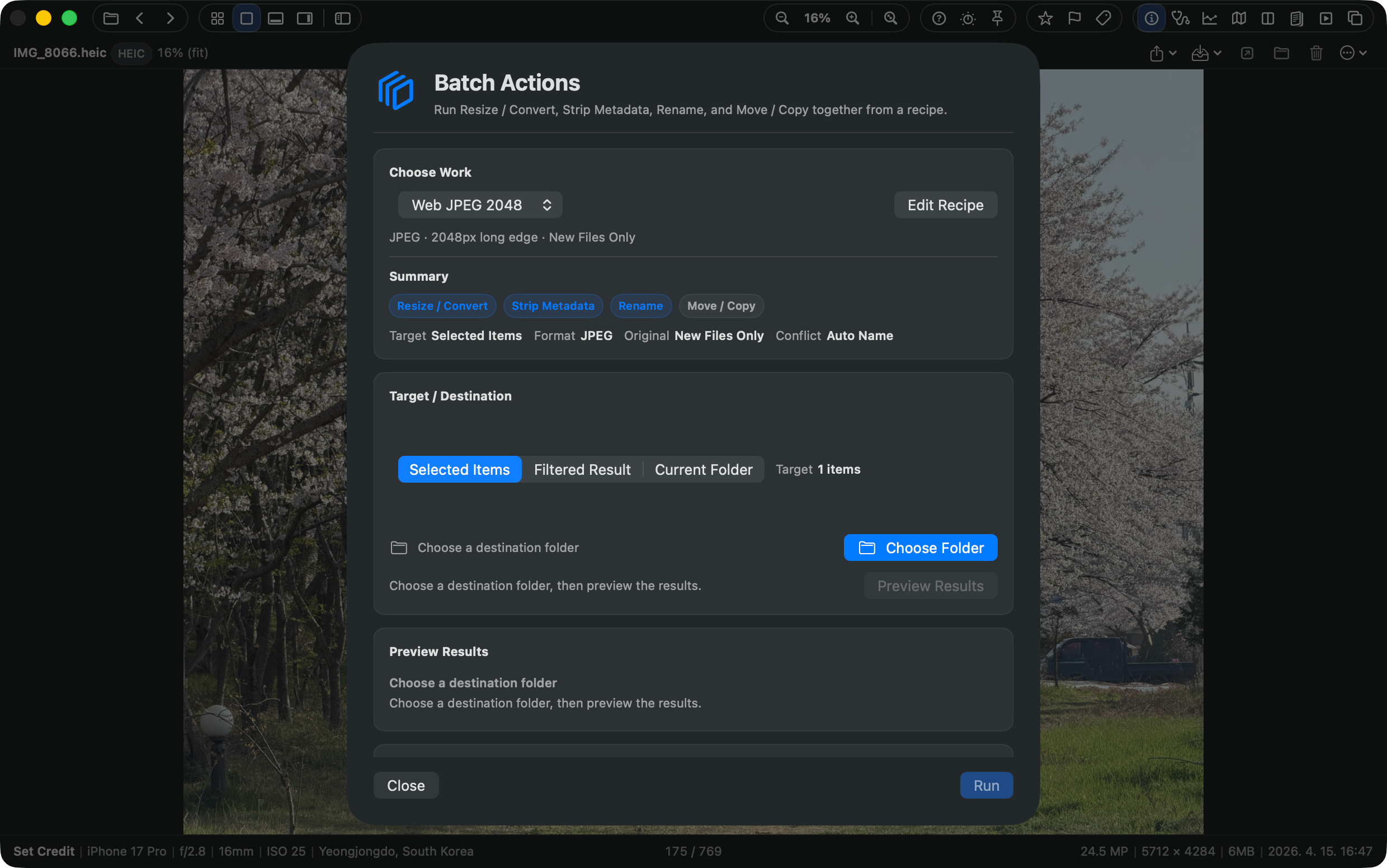
Preview batch actions before you run them

Turn a finished review set into action. SnapView keeps up to three visible recipes for previewed copy, move, and export workflows.

  • Preview before execution
  • Copy, move, and export recipes
  • Apply to the selected review set
SnapView batch action preview

Specifications & Features

OS macOS 14.0 or later (Apple Silicon and Intel Mac universal)
Formats RAW (ARW, CR2, CR3, NEF, NRW, DNG, RAF, ORF, RW2, PEF, SRW, 3FR, FFF, CRW, RWL, SR2, IIQ)
JPG, PNG, GIF, BMP, WEBP, HEIC, HEIF, TIFF, PSD, JPEG 2000, DICOM, EXR/HDR, TGA, ICNS
Video: MP4, MOV, M4V
Writes XMP Sidecar (Ratings, Flags)
+ Direct ZIP Archives Browsing
Performance Metal Accelerated, Zero-Import Delay
Key Features
  • No import process or heavy catalog generation
  • Ultra-fast directory browsing & predictive keyboard navigation
  • Browse ZIP archives in real-time without extracting
  • 4 Versatile View Modes (Main / Grid / Filmstrip / Pro Layout)
  • Pro Layout View with action strip, info strip, and thumbnail context
  • Quick Organize with 3 visible presets, GPS map review, and 3 previewed batch recipes
  • Apple Photos browsing, Photos-style Favorite heart, and Photos ↔ disk copy workflows
  • HDR photo viewing, quick HDR/SDR switching, and non-AI upscaling
  • Consistent sorting across Main, Grid, and Filmstrip with counter/context-menu controls
  • Select Tray candidate/final/excluded sets and selected-original handoff
  • Drag handoff from Main, Grid, and Filmstrip to Finder, Desktop, editing apps, and Photos
  • Command-P print and PDF save for current images, selections, folders, and contact sheets
  • Multi Monitor Workspace for Navigator, Quick Check, Histogram, Map, Filmstrip, and Select Tray panels
  • Rust-based faster thumbnail handling for large Grid and Filmstrip folders
  • Persistent thumbnail disk cache for repeat Grid, Filmstrip, and Navigator browsing
  • Optional Supporter Pass for continued development, with Mac App Store purchase restore
  • Real-time playback/view of RAW, HEIC, and animated formats
  • Adjustable Smart Decoding Modes (Speed vs Quality priority)
  • Intuitive Fullscreen Slideshow review with transition effects
  • Real-time culling sync with Lightroom (XMP Rating, Pick/Reject)
  • Seamless integration with macOS Finder color tags
  • Visual Duplicate checking and batch cleaner
  • Side-by-side multiple image Compare Mode (up to 4 images)
  • AI-assisted Quick Check (flags for blink, focus, exposure)
  • Image Export for smaller sharing copies (JPEG/PNG, social presets)
  • On-device OCR to recognize and copy text from photos
  • Capture date/GPS edits for supported photos
  • Intuitive Histogram, detailed EXIF info, and GPS Map panels
  • Seamless keyboard-centric File Management (Select/Copy/Paste/Delete)
  • Convenient Always On Top mode for multi-tasking

FIND SNAPVIEW BY WORKFLOW

Find the image browsing workflow you need.

Explore SnapView by folder browsing, Preview alternative workflows, FastStone-style expectations, and WebP/HEIC/GIF format review.

Mac image viewer Folder-first image browsing for Mac users Preview alternative When Preview is not the right tool for a whole folder FastStone alternative Folder browsing for users moving to Mac workflows WebP, HEIC, GIF viewer Review modern image formats in one Mac viewer

View. Cull. Edit. Stay in the flow.

SnapView 3.0 · Creative Suite Preview

SnapView 3.0.1 · September 14, 2026 One Universal app supports Apple silicon and Intel Macs.